AI Platform •
14 min read •January 30, 2026•468 views
Top Image Annotation Tools for Effective Data Labeling
Table of Contents
Data annotation is a necessity in the development of machine learning and AI, where the model needs to be trained to identify patterns and make predictions. Image annotation tools in particular are relevant in areas such as computer vision, autonomous driving, and healthcare, where precise image labelling is essential. The tools assist the machine to comprehend visual information, thus the AI resembles human intelligence.
Many annotation tools are on the market, so it may be hard to pick the right one. Be it AI data annotation, object detection training models, or image recognition, choosing the most efficient and accurate data annotation platform is paramount.
This blog discusses the image annotation tools used by the AI applications developers and data scientists to develop high-quality labeled datasets to produce powerful AI models
What is Image Annotation?
Image annotation is the process of labeling or marking images by adding information that helps machines interpret them. Image annotation plays an extremely significant role in training machine learning and artificial intelligence models.
As an example, in object detection, image annotation involves drawing bounding boxes to mark objects in a picture and assigning them labels such as car, person, or dog. The image annotation tools make this process easier since one can annotate images with accuracy and efficiency.
By converting raw visual information into labeled data, these tools help the AI models to learn and identify patterns, therefore, becoming more accurate in image recognition, facial recognition, self-driving vehicles, and medical visualization. Annotations may be of various types, and these include:
Bounding boxes: Bounding boxes are used to outline objects in the picture in the form of a rectangle.
Polygons: Polygons are utilized in emphasizing the exact form of an object, which is more adaptable than bounding boxes.
Semantic segmentation: This is applied to classify each pixel in an image into various components.
Keypoints: Used to indicate particular points on an object, e.g., joints on a human body or features on a face.
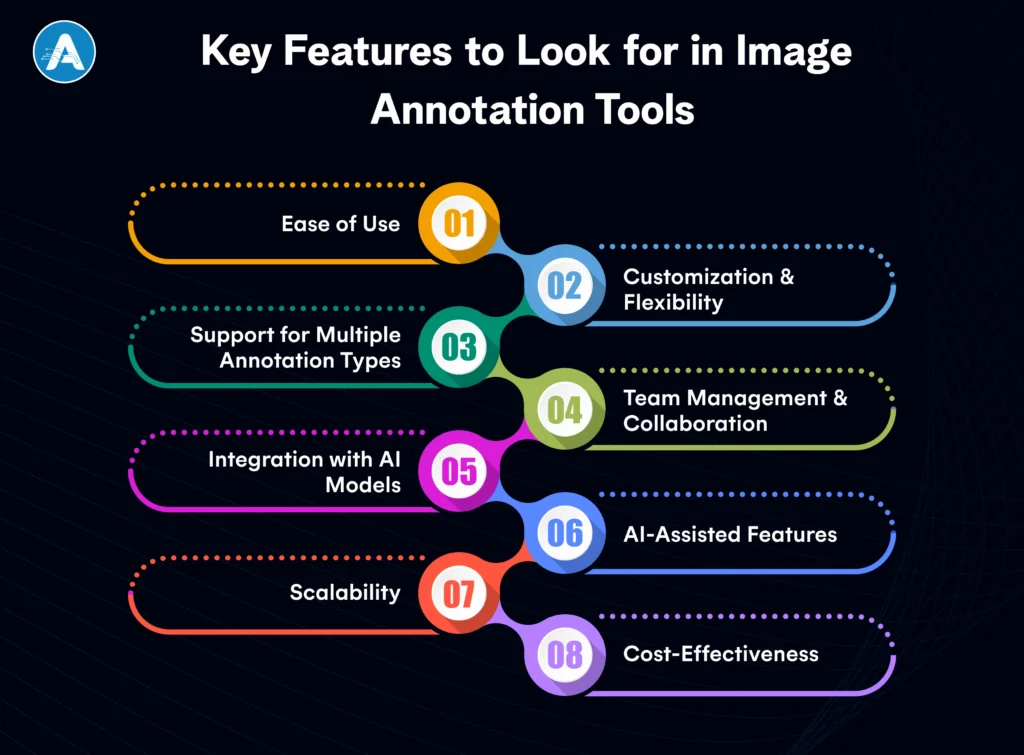
Key Features to Look for in Image Annotation Tools
When choosing the appropriate image annotation tool to use in your project, a few features can cause a big difference in the speed and precision of labeling data by your team. The following are the major factors to be seen:
1. Ease of Use
Teams with large datasets should have a user-friendly interface. Alone or working in a team of AI application developers, the tool must be easy to use and allow minimal time to acquire the system. Search in tools that are easily navigable and labeled with a minimum of clicks.
2. Customization & Flexibility
The best data annotation tools provide customizable labeling options. This feature lets you define specific classes or labels based on your project needs. Whether you’re using a dataset annotation tool for object detection or AI data annotation for facial recognition, customization ensures you can adjust the tool to fit your project.
3. Support for Multiple Annotation Types
Various projects might have different types of annotations. The picture annotation tool must also allow different types, including bounding boxes, polygons, lines, and semantic segmentation. Find applications that enable you to make notes on various types and formats of images, as well as still photos and video.
4. Team Management and Collaboration
A large number of image annotation tools are collaborative and allow multiple annotators to work on the same project at the same time. This is required in large teams, particularly when you are dealing with large volumes of data in your project. Labeled can be faster with tools that enable version control and feedback loops among the various team members.
5. Integration with AI Models
A good image annotation tool should not only help you label your data but also integrate seamlessly with your AI training pipeline. Various tools are helpful in exporting labeled data to formal AI application development services, and it becomes simpler for the AI development companies to commence the training models immediately.
6. AI-Assisted Features
There are also tools with AI-assisted annotation, which may be used to accelerate the labeling process. AI data annotation tools may label some features within an image using previously trained models, and this reduces the workload. It is particularly dedicated to big data annotation.
7. Scalability
It may have a very small beginning, but your project may expand very quickly as you generate more data. Select data annotation platforms that can adapt to your scale. The tool must be capable of processing even a large dataset without slowing down, whether you are annotating a few pictures or a million images.
8. Cost-Effectiveness
Lastly, compare the price of the tool depending on the size of your project. Although there are free image annotation tools, there are also those that may be priced on a per-image basis or per-user. The tool should fit within your budget for the project and offer the features that you require.
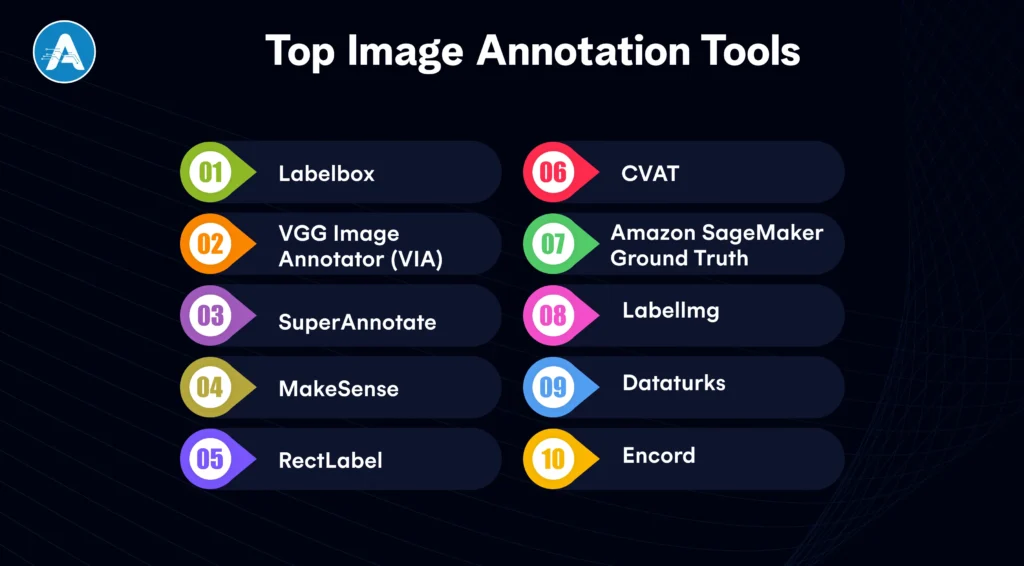
Choosing the right image annotation tool can greatly impact how efficiently and accurately you annotate your data. Below are some of the best image annotation tools available today, each with unique features designed for different needs and budgets.
1. Labelbox
Labelbox is the definitive enterprise data annotation platform that unifies data labeling, model training, and diagnostics in a single workspace. It utilizes Model-Assisted Labeling to allow an AI application developer to pre-label datasets using their own models, drastically reducing manual effort.
This platform is ideal for an AI app development company handling massive, complex projects that require SOC2-compliant security and deep team collaboration.
Key Features
AI-assisted annotation
Custom labels
Robust collaboration tools
Scalable data labeling
2. VGG Image Annotator (VIA)
VIA remains the world’s favorite lightweight, open-source picture annotation tool because it requires zero installation and runs entirely in a web browser. Developed by Oxford University, it provides a simple yet effective interface for manual tasks like bounding boxes and polygons without any data leaving your local machine.
It is the perfect dataset annotation tool for researchers and students who need a fast, private, and cost-effective solution.
Key Features
Open-source
Supports multiple annotation types
Exports to various formats
3. SuperAnnotate
SuperAnnotate is a high-velocity AI data annotation engine designed to handle large-scale datasets with advanced automation. Its Magic Select tool uses AI to snap to object boundaries, transforming hours of manual image labelling into minutes of simple verification.
Trusted by global innovators, it integrates seamlessly into the pipelines of any AI application development services provider looking for a “human-in-the-loop” workflow.
Key Features
AI-powered pre-labeling
Customizable workflows
Cloud-based collaboration
4. MakeSense
MakeSense is a no-frills, browser-based dataset annotation tool that prioritizes speed and accessibility for small-scale deep learning projects. By leveraging an intuitive interface and open-source TypeScript architecture, it allows users to start labeling instantly without a sign-up process.
It is an excellent picture annotation tool for budget-conscious developers who need to export high-quality labels in multiple formats like YOLO or COCO.
Key Features
Free
Easy-to-use
Supports various image annotation formats
5. RectLabel
RectLabel is a specialized image annotation tool built exclusively for macOS, offering deep integration with Core ML for automated labeling. It excels at complex tasks such as facial keypoint annotation and polygonal segmentation, making it a powerful video annotator for Apple ecosystem developers.
Its 2026 updates include support for Segment Anything Model 2 (SAM 2), allowing for pixel-perfect masks with just a single click.
Key Features
Bounding boxes
Polygonal segmentation
Facial keypoints annotation
6. CVAT
Developed by Intel, CVAT (Computer Vision Annotation Tool) is the leading open-source data annotation tool, especially recognized for its strong performance with video datasets. As a powerful video annotator, it uses frame-level interpolation to track objects automatically across several seconds of footage, saving countless manual hours.
Many AI development companies widely use it because of its multi-user support and the option to host it on private servers.
Key Features
Open-source
Multi-user support
Advanced AI-powered features like active learning
7. Amazon SageMaker Ground Truth
SageMaker Ground Truth is a fully managed data annotation platform that leverages AWS’s massive infrastructure to scale labeling for enterprise-level models. It uniquely offers access to a global workforce alongside AI data annotation features that automatically label easier data while sending difficult cases to human reviewers.
For companies already using AWS AI application development services, it provides a frictionless path from raw storage to a trained model.
Key Features
Integration with AWS
AI-powered pre-labeling
Scalable data labeling
8. Labellmg
LabelImg is a classic, lightweight picture annotation tool designed specifically for drawing rectangular bounding boxes for object detection. It is written in Python and is completely free, making it the most approachable entry point for any AI application developer starting their first project.
While it focuses on simplicity, its native support for Pascal VOC and YOLO formats makes it highly compatible with most modern machine learning frameworks.
Key Features
Open-source,
Intuitive interface
support for XML
Pascal VOC formats
9. Dataturks
Dataturks offers a flexible, software-as-a-service data annotation platform that manages image, video, and text data in a single interface. It is designed for team efficiency and can boost labeling speed by up to five times with its easy keyboard shortcuts and real-time collaboration tools.
It is a favored dataset annotation tool for startups that need to quickly create diverse training sets for multi-modal AI models.
Key Features
Multi-format support
Collaboration tools
API integration
10. Encord
Encord is a video annotator and data management platform designed to handle large, high-resolution video datasets easily. It stands out by offering Micro-models that learn from a small number of human labels to automatically annotate the rest of the dataset. This makes it an independent AI data annotation partner.
This tool is popular with an AI development company that focuses on long-form video analysis. It simplifies the dataset annotation workflow with strong automated object tracking and quality control dashboards.
Key Features
AI-powered annotation tools
model training
active learning
version control
collaboration features
How to Choose the Right Image Annotation Tools for Your Project
Selecting the right image annotation tools is crucial for ensuring an efficient data annotation process and achieving high-quality labeled data. Here are key factors to consider when choosing the best image annotation tools for your project:
Project Scale & Complexity
For small-scale projects, a basic image annotation tool may be enough to handle simple image labeling tasks and smaller datasets.
For larger, more complex projects, image annotation tools that offer Artificial Intelligence data annotation features and team collaboration will be necessary to manage high-volume datasets and multiple users effectively.
Annotation Type & Customization
Different projects require different types of annotations. Ensure the image annotation tools you choose support various annotation formats such as bounding boxes, polygonal segmentation, or semantic segmentation.
Look for data annotation tools that allow customizable labels, so you can tailor the annotation process to your specific project requirements.
Collaboration & Team Management
When collaborating with a team, it is preferable to use image annotation tools that provide such collaboration capabilities as real-time and version control. This will make sure that your team will be able to work in large datasets without overlapping or confusion.
The tools that have data annotation platform capabilities can be used to simplify the working process and manage team-based projects efficiently.
Integration with AI Models and Pipelines
In the case of projects related to AI application development services, make sure the image annotation tools that you choose are easy to integrate with your AI models and processes.
Look for image annotation tools that allow you to export annotated data directly into your AI application developer environment for training, which helps save time and improves model performance.
Cost & Budget
Free image annotation tools may be suitable for small, non-commercial projects or personal use, but for larger and more complex projects, you may need to spend at least a little to buy a paid solution that is more advanced.
Compare the prices of data annotation tools; some of them cost according to the number of images annotated, others by subscription or pay-per-user. Select the model that fits your budget for the project.
AI-Powered Functions
Most image annotation tools also have AI-assisted functionality, which can greatly accelerate the annotation effort by providing pre-labels on pictures according to an already trained model. This saves time, which was used in manual labeling, and makes the process even more effective.
Ease of Use & Support
Choose image annotation tools that are easy to use and require minimal training. Ease of use can enhance the functionality of your team, particularly when dealing with big data.
Look at the customer support that the tool offers, including documentation, tutorials, and the availability of a support team. A highly supported tool would eliminate delays and technical errors in the course of annotation.
Wrap Up
The selection of the appropriate image annotation tools is very important in every AI project because the quality of the labeled data directly correlates with the accuracy and performance of your models. Regardless of the scale of your projects (small-scale or enterprise-level datasets), a tool that best fits your needs will facilitate the data annotation process and improve the performance of your model.
AI-assisted annotation to collaborative efforts with and through AI application development services, you can save time, enhance accuracy, and make sure that your project moves forward with the correct image annotation tool. Evaluating the aspects such as scalability, cost, ease of use, and types of annotation, you may make the right choice that will help in successful AI initiatives.
Ultimately, it will be the appropriate tool that will enable your team to produce quality, labeled datasets and unleash the power of AI. You can be a developer of AI applications or a company that focuses on the creation of AI solutions, so investing in proper image annotation tools is a mandatory stage to develop proper, data-driven solutions based on AI.
Planning for AI Project
Get clarity on use cases, architecture, costs, and timelines with insights from 50+ real-world AI implementations.
Image annotation tools are computer programs that annotate or label images with certain data, which allows AI models to interpret and learn the visual data. The tools play a critical role in machine learning, particularly in object detection, image classification, and segmentation processes.
2. Why do image annotation tools matter in the development of AI?
The annotation of data is the essential process of AI model training, as it gives the model the labeled data on which to learn. Image annotation technology accelerates, improves, and scales this process, which has a direct influence on the quality and performance of the resulting AI models.
3. What sort of annotations are image annotation tools able to support?
Image annotation tools typically allow multiple types of annotation, such as bounding boxes, polygons, semantic segmentation, keypoints, and landmark annotation. The complexity of the project and the type of needs of the model you are training will determine which type of annotation you can use.
4. Is it possible to use video data labelling with image annotation tools?
Ok, video labeling is also supported by many image annotation tools. Frame-by-frame annotation can be done with these tools, and, therefore, they can be used in video-based tasks, including action recognition, object tracking, and event detection.
5. What are the AI-assisted features used to support image annotation?
AI data annotation tools that have AI-assisted capabilities can be used to automatically provide suggestions of labels or annotations to images using pre-trained models. This also helps a great deal in cutting down on the manual work that is necessary and can be done much faster, particularly with large data sets.
6. Are there any free tools for annotating images?
Sure, a few of the free tools helping to annotate images are mentioned, including LabelImg and MakeSense. The tools are suitable for small-scale projects, personal usage, or in cases of limited resources. Paid tools, which may have more features and support, may be howeve, however, beneficial to larger and more complex projects.
7. What is the best image annotation tool to be used in my project?
The scale and complexity of your project, the kind of annotations your project needs, budget, integration with your existing workflows, and collaboration are some of the factors to consider when selecting the right tool. In the case of larger projects or teams, AI-assisted tools, as well as collaboration, could be needed.
NLP in Healthcare is rapidly transforming how medical data is processed, analyzed, and utilized. With nearly 80% of healthcare data unstructured, ranging from clinical…
Hiring has always been one of the most critical and challenging functions for any organization. Yet, traditional recruitment processes often rely on manual screening,…