AI Platform •
11 min read •February 9, 2026•347 views
Best AI Apps for iPhone You’ll Actually Use Every Day
Table of Contents
Many AI apps for iPhone are very good, but it’s more difficult to decide which ones are worth keeping. With hundreds of AI apps for iPhone available, most of them are downloaded, tested once, and deleted within a few days.
Only a handful of apps survive. They are the ones that respond quickly, understand context, and deliver useful output without making users learn new skills.
What makes the best AI chat apps different is their consistency. People rely on these AI apps for iPhone to draft messages, summarize content, generate ideas, and get instant explanations of tasks that previously required multiple apps or repeated searches. This is also why free AI apps for iPhone and AI chatbot free tools now see repeat daily usage instead of one-time curiosity installs.
This article focuses only on AI applications for iPhone you’ll actually use every day. Every app covered here earns its place through reliability, speed, and practical value, whether you’re using a free AI app, a paid plan, or switching between iPhone and Android. No experiments, no filler, just apps that behave like the best free AI app should: reliable, fast, and genuinely useful.
Why AI Apps for iPhone Have Become Everyday Tools
AI apps for iPhone have earned daily usage because they remove small but constant frictions from everyday tasks. Instead of switching between search, notes, email, and productivity apps, users can now complete multiple actions inside a single AI chat app. On iPhone, this experience feels natural: open the app, ask, act, and move on.
This shift didn’t happen by accident. It reflects how modern AI application development services focus on reducing steps, simplifying interfaces, and delivering immediate value rather than overwhelming users with features.
What’s driving daily adaptation?
Faster than search: Asking an AI chatbot is quicker than opening a browser, refining queries, and scanning results.
One app, multiple tasks: A single AI app for iPhone can draft messages, rewrite content, summarize text, and generate ideas.
Low effort, high output: Modern AI chatbots understand context and follow-ups without complex prompts.
Useful free plans: Many free AI apps and AI chatbot free tools now offer enough value for daily use.
Mobile-first convenience: Always available, touch-friendly, and designed for short, frequent interactions.
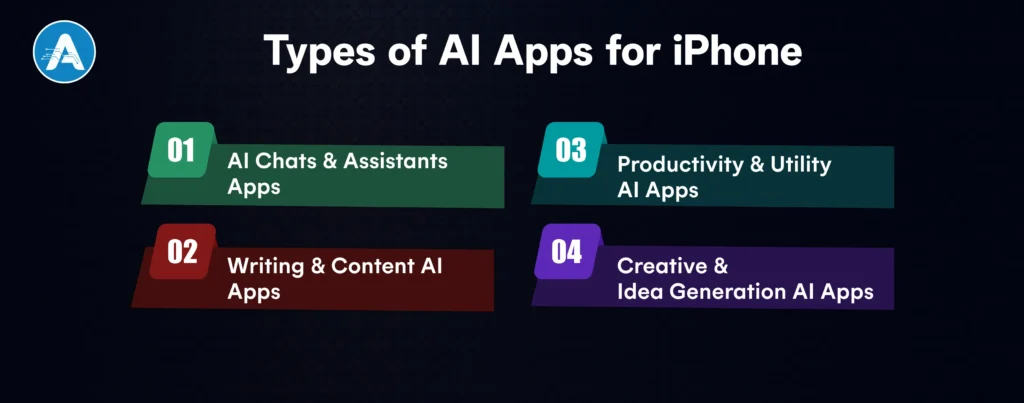
Types of AI Apps for iPhone
AI apps for iPhone fall into a few clear categories based on how people actually use them day to day. Understanding these types helps avoid downloading multiple overlapping apps and makes it easier to choose the specific AI apps for iPhone that fit your routine. Something both users and any serious AI development company prioritize when designing scalable products.
1. AI Chats & Assistants Apps
These are conversation-first tools designed for quick answers, explanations, and brainstorming. Most users rely on them as a replacement for search or basic research. This category includes AI chat apps, AI chat online tools, and general chatbot apps.
2. Writing & Content AI Apps
Built for drafting, rewriting, and summarizing text. These apps are commonly used for emails, social posts, notes, and quick content edits. Many overlap with chatbots but focus more on structured output and tone control.
3. Productivity & Utility AI Apps
These AI apps for iPhone support planning, task breakdowns, summaries, and decision-making. They’re popular with users who want AI support embedded into daily workflows rather than casual conversation.
4. Creative & Idea Generation AI Apps
Focused on generating ideas, prompts, captions, or creative concepts. Some also include image or visual assistance, but the daily-use value usually comes from fast ideation.
Below is a clean, practical breakdown of the most useful & Best AI apps for iPhone, written for real daily usage, not just for hype. Each app follows the same evaluation pattern, so readers can quickly compare and decide what fits their routine.
1. ChatGPT
ChatGPT is a powerful AI chat app that answers questions, writes content, explains code, helps with learning, and brainstorms ideas using natural conversation.
Why is it useful every day?
It replaces multiple tools such as search engines, note-takers, tutors, and writing assistants in one AI chatbot free-style experience.
Free vs paid value
Free: Strong AI chat generator
Paid: Faster, smarter responses and advanced reasoning
Who it’s best for
Students, professionals, developers, and anyone wanting the best AI chatbot experience.
2. Google Gemini
Gemini is Google’s AI chat app built for reasoning, research, and productivity across Google services.
Why is it useful every day?
Perfect for AI chat online research, summaries, planning, and smart answers tied closely to Google tools.
Free vs paid value
Free: Solid AI chatbot free option
Paid: Advanced models and deeper integrations
Who it’s best for
Google users who want a fast, reliable AI chat app.
3. Microsoft Copilot
Copilot is an AI assistant embedded into Microsoft apps like Word, Excel, and Outlook.
Why is it useful every day?
It automates writing, calculations, and data analysis, saving hours daily.
Free vs paid value
Free: Basic AI chat and web answers
Paid: Best experience inside Microsoft 365
Who it’s best for
Office users and professionals who want an AI app for iPhone and desktop productivity.
4. Perplexity AI
Perplexity is an AI chat generator focused on real-time, cited answers.
Why is it useful every day?
It’s like Google plus ChatGPT fast, factual, and transparent.
Free vs paid value
Free: One of the best free AI apps for research
Paid: Advanced models and deeper searches
Who it’s best for
Researchers, students, and anyone who values accurate AI chat online.
5. Grammarly
Grammarly improves grammar, tone, clarity, and writing quality using AI.
Why is it useful every day?
It works everywhere: emails, messages, documents, without effort.
Free vs paid value
Free: Excellent daily writing corrections
Paid: Style, tone, and rewrite suggestions
Who it’s best for
Writers, professionals, and students need a reliable AI app with a free option.
Otter.ai records, transcribes, and summarizes meetings using AI.
Why is it useful every day?
It replaces manual note-taking and keeps meetings searchable.
Free vs paid value
Free: Limited transcription minutes
Paid: Best for frequent meetings
Who it’s best for
Remote workers, students, and journalists.
7. Wordtune
Wordtune rewrites sentences to sound clearer, more formal, or more casual.
Why is it useful every day?
It upgrades everyday writing instantly.
Free vs paid value
Free: Basic rewrites
Paid: Unlimited tone and length control
Who it’s best for
Anyone writing emails, posts, or documents daily.
8. ParagraphAI
ParagraphAI generates paragraphs, replies, and messages with one tap.
Why is it useful every day?
Great for fast communication without overthinking.
Free vs paid value
Free: Limited daily use
Paid: Unlimited writing
Who it’s best for
Busy users who want a quick AI chat app for writing.
9. DeepL
DeepL is an AI-powered translation app known for accuracy.
Why is it useful every day?
It translates naturally, not word-for-word.
Free vs paid value
Free: One of the best free AI apps for translation
Paid: Advanced formats and privacy
Who it’s best for
Travelers, students, and global professionals.
10. Tiimo
Tiimo uses AI to help with planning, routines, and focus
Why is it useful every day?
It simplifies time management and reduces overwhelm.
Free vs paid value
Free: Basic planning
Paid: Custom routines and insights
Who it’s best for
Neurodivergent users and productivity seekers.
11. FYI.AI
FYI.AI summarizes long documents, emails, and reports.
Why is it useful every day?
It saves time by extracting only what matters.
Free vs paid value
Free: Limited summaries
Paid: Power-user features
Who it’s best for
Knowledge workers and executives.
12. Siri
Siri is Apple’s built-in AI assistant for voice commands and automation.
Why is it useful every day?
Hands-free control for reminders, calls, and smart devices.
Free vs paid value
Free: Built-in AI apps for iPhone
Paid: Not required
Who it’s best for
Every iPhone user wants a basic AI chatbot free experience.
13. Cleo
Cleo is an AI chatbot app for personal finance.
Why is it useful every day?
It tracks spending and gives budgeting advice conversationally.
Free vs paid value
Free: Basic money insights
Paid: Advanced financial coaching
Who it’s best for
Anyone managing personal finances.
14. Picsart AI
Picsart AI edits photos, removes backgrounds, and generates visuals.
Why is it useful every day?
It’s a versatile AI app for iPhone, perfect for social media creators.
Free vs paid value
Free: Strong AI app free features
Paid: Pro templates and exports
Who it’s best for
Creators and marketers.
15. Replika
Replika is an AI chatbot designed for emotional conversation.
Why is it useful every day?
It provides companionship and stress relief.
Free vs paid value
Free: Basic chat
Paid: Deeper personalization
Who it’s best for
Users seeking conversational AI support.
iPhone vs Android: Are These AI Apps Cross-Platform?
Most leading AI apps for iPhone are no longer locked to one platform. The majority of apps listed above are available on both iOS and Android, but the experience is not always identical. iPhone users typically benefit from smoother UI, better system-level integrations, and more consistent performance, especially for chat-based AI apps.
What’s generally the same across iPhone and Android:
Core AI models and response quality
Free vs paid plans
Chat, writing, and generation features
Account sync across devices
Where iPhone often has an edge:
Cleaner UI and gesture-based navigation
Better voice, keyboard, and system integrations
Faster updates and feature rollouts for some apps
More stable background performance
What Android users should know:
Most apps still qualify as a solid AI app for Android
Daily usability depends more on the app than the platform
FInal Thought
The top AI apps for iPhone are not necessarily the ones with the most features, but the apps that you are returning to. Once the AI application is capable of responding to questions, writing, summarizing, organizing tasks, or coming up with ideas without clicks, it will not feel like a tool anymore but rather a utility.
Most users find a free AI app more than adequate for daily use. Free plans today are not placeholders; they’re a viable strategy supported by thoughtful AI application development services. The real advantage comes from choosing one or two trustworthy AI apps for iPhone rather than downloading dozens.
When an AI application can save time, lessen effort, and become a part of your iPhone workflow, it is performing its job. That is what makes a good AI app a great AI app and why the best AI apps for iPhone should soon be permanently displayed on your home screen.
Planning for AI Project
Get clarity on use cases, architecture, costs, and timelines with insights from 50+ real-world AI implementations.
ChatGPT, Google Gemini, and Microsoft Copilot are widely regarded as the best AI applications because every one of them can address chat, writing, summaries, and daily tasks reliably in one location.
2. Do any free AI iPhone applications even exist?
Yes. Some of the apps can be considered the best free AI app such as ChatGPT (free version), Perplexity AI, Grammarly, DeepL, Siri, and Socratic by Google. These provide real value daily without any subscriptions.
3. Does it come with a free AI app that can be used daily?
For most users, yes. Free AI applications typically are enough to chat, write, get assistance with homework, summaries, translations, and study. The major features added to paid plans are speed, sophisticated models, and increased usage quota.
4. What is the difference between an AI chat application and a chatbot application?
In real life, there is not much difference. The current AI chat applications are mainly chatbot applications that can be used to converse, ask follow-up questions, and generate content. It is not the label but the AI model that makes the quality.
5. Are these AI applications compatible with iPhone offline?
The majority of AI applications need internet access since they are processed on the cloud. Siri is capable of performing some of the simplest offline tasks, but more complex AI chat and generation require an online connection.
NLP in Healthcare is rapidly transforming how medical data is processed, analyzed, and utilized. With nearly 80% of healthcare data unstructured, ranging from clinical…
Hiring has always been one of the most critical and challenging functions for any organization. Yet, traditional recruitment processes often rely on manual screening,…